
RestoTrack · Couriers and delivery
Couriers and orders on one screen. Delivery made easy to manage.
Delivery orders assigned from your RestoPOS till go straight to the courier's phone. The courier sees the address, the amount and the customer's note, and opens navigation with a single tap. At the till, you follow live which courier is where and which order is running late. Works on Android and iOS phones.
What are we selling?
We don't sell a courier app. We sell delivery you manage from the till.
In delivery, time gets lost on the phone: "Has the courier left? Where are they? When will they arrive?" With RestoTrack, every step from the moment an order is assigned to a courier until it is delivered is passed to RestoPOS. The courier on the road and you at the till see the same information.
-
1
The order is assigned
The order is assigned to a courier from the till, or the courier scans the order's QR code and takes it on. The courier gets a notification on their phone.
-
2
It is picked up
The courier taps "Pick Up" when collecting the package from the business.
-
3
On the road
Navigation opens with a single tap. The courier's location appears on the map at the till all along the way.
-
4
It is delivered
The courier confirms delivery. If the order cannot be delivered, they report it with the reason; the status is passed to RestoPOS.
Who is it for?
Every business that delivers with its own couriers.
Once you have more than two couriers, "who is where?" becomes the question the till asks most. RestoTrack puts the answer on screen.
Restaurants
Delivery orders keep moving even when the dining room is full; the till sees the courier's status without calling them.
Pizza and fast food
At peak times, a late order shows up in red at the till, so it goes out first.
Businesses with their own courier team
Which courier is free, which is on the road, which is offline: all at a glance from the till.
Multi-site businesses
The same set-up in every branch: orders go from the branch's till to the courier.
Multilingual teams
With support for 14 languages, every courier can use the app in their own language.
How does an order reach the courier?
There are two ways. Both take seconds.
Depending on how the business works, the order is assigned to a courier from the till or the courier takes it on themselves. Whichever way it comes, the order lands in the courier's list and they get a notification.
The till chooses the courier
The order is assigned to a courier on your RestoPOS till. It reaches the courier's phone as a notification and is added to their list.
The courier scans the QR code
The courier taps "Scan QR Code", scans the order's QR code and the order is theirs. If the code cannot be read, it can also be entered by hand.
Modules
From order to delivery. Everything the courier needs, in their pocket.
In the app, the courier sees only what they need: their orders in sequence, the address, the amount and their history.
My orders
The next package is at the top.
Ordered list
Orders arrive in delivery order.
- Each order's sequence number on its card
- Orders are delivered in sequence
- The list updates with the refresh button
Everything on the card
What matters is visible without opening the details.
- Customer, amount and address
- The customer's order note
- Phone: call or copy with a single tap
Timing and notifications
A late order doesn't go unnoticed.
- Minutes left until the delivery time, on the card
- Late orders in red, with minus minutes
- Phone notification for each new order
Order details and navigation
The address on the map, the route a tap away.
Map
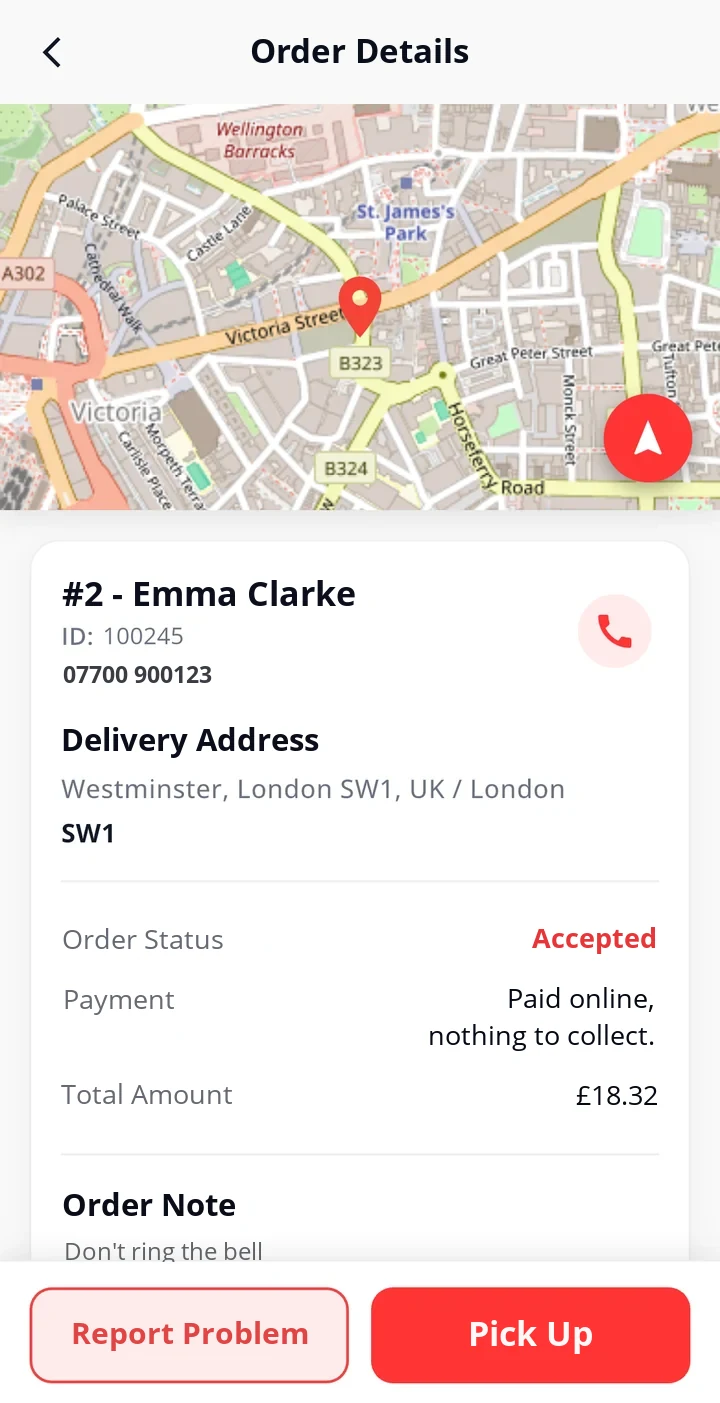
The delivery address is marked on the map.
- Address and postcode below it
- Navigation button on the map
Navigation
The courier uses the app they know.
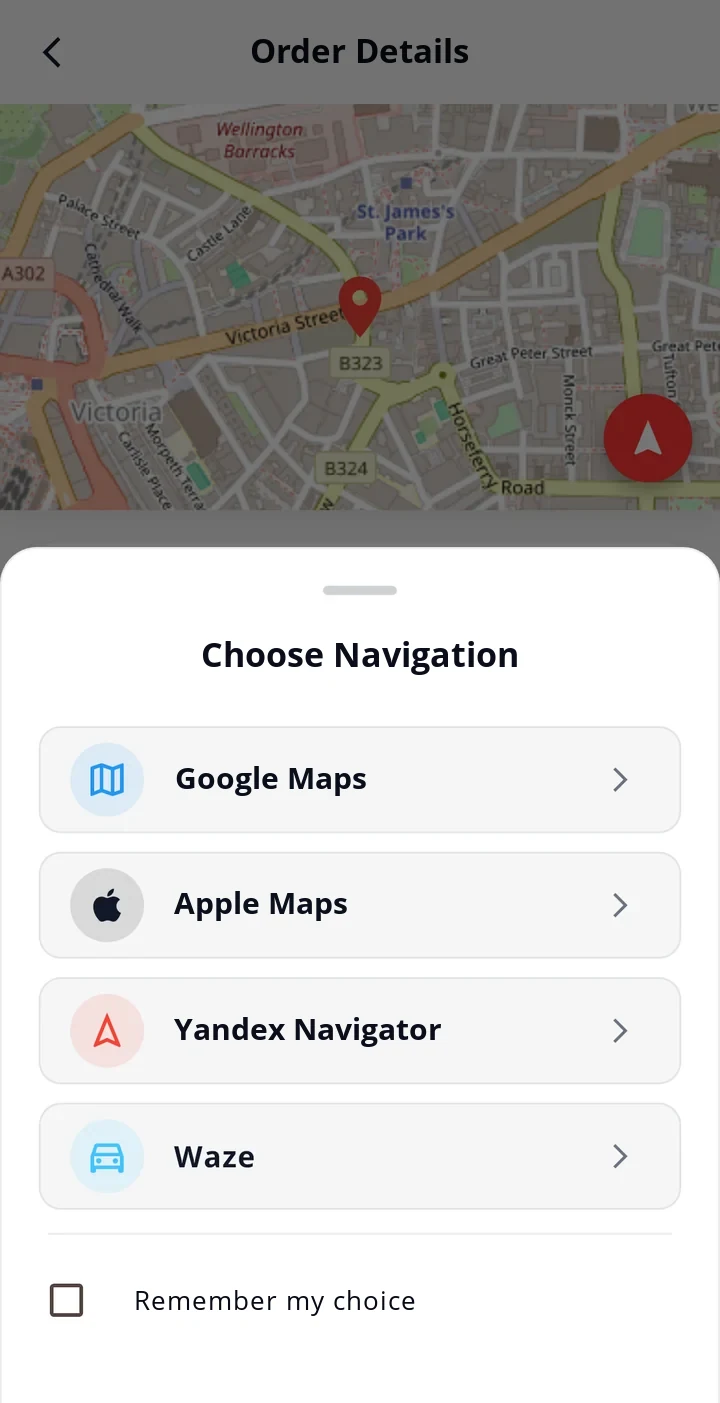
- Google Maps, Apple Maps, Yandex Navigator, Waze
- Chosen once with "Remember my choice"
- The default app can be changed in settings
Status buttons
Each step is a single tap.
- Pick Up, On My Way, Deliver
- Report Problem: an undeliverable order is reported with the reason
- Payment details and the amount to collect on screen
Order history
The courier knows what they have carried.
Filters
By status and by date.
- All, Delivered, Failed, Cancelled; each with its count
- Date range selection and total number of orders
Order card
A summary of each order.
- Date, number of items, total amount, payment
- The reason, for an undelivered order
Customer data is protected
Personal data is kept only for a limited time.
- The customer's name, phone number and address are removed from the courier history 24 hours after delivery
- The amount, items and times stay in the history
Language and use
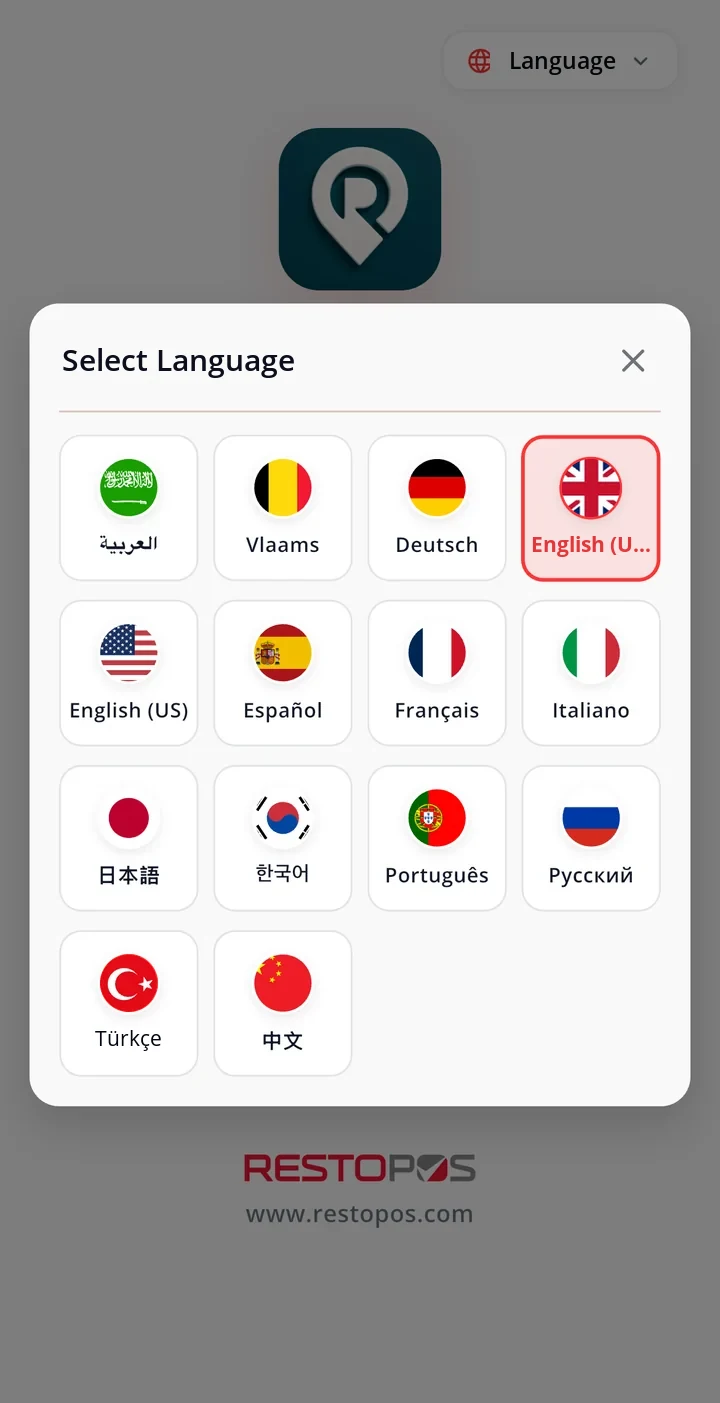
Every courier in their own language.
14 languages
Chosen by tapping a flag.
- Turkish, English (UK and US), German, Dutch (Flemish)
- French, Spanish, Italian, Portuguese, Russian
- Arabic, Chinese, Japanese, Korean
Dark theme
Easy on the eyes during evening service.
- Switched on from the menu with a single tap
Courier account
Every courier under their own name.
- Log in with a username and password
- Change password and forgotten password
My orders
The next package is at the top. The rest wait their turn.
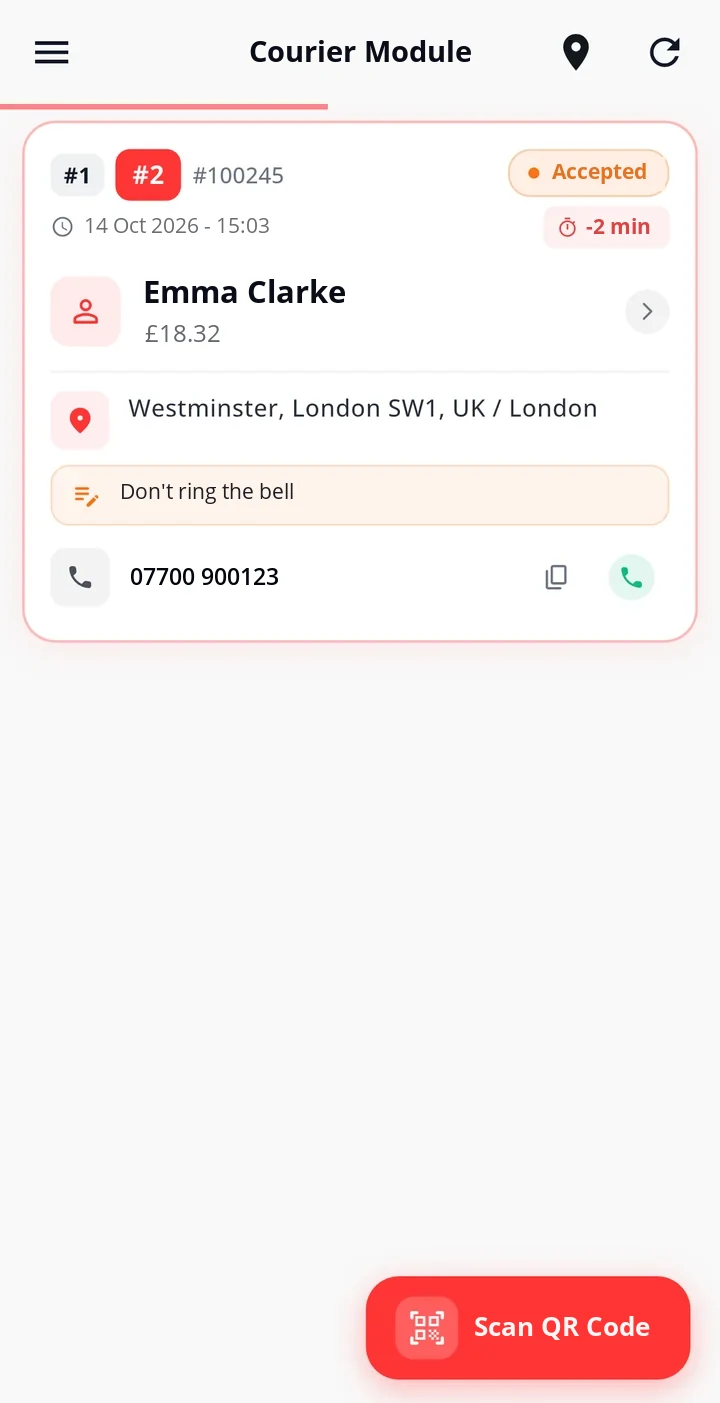
When the courier opens the list, they know which package to take first; orders are delivered in sequence. The card shows the customer's name, the amount, the address and the note; the minutes left until the delivery time count down in the top right. The courier doesn't choose the payment type: they are told whether the order has been paid online and how much to collect at the door.
- Delivery in sequenceEach order's sequence number on its card.
- Delay timerMinus minutes in red once the time is up.
- One-tap callingCalls the customer from the card or copies the number.
- Payment to collectPayment status and the amount to collect are known in advance.
Navigation
The address in your navigation app with a single tap.
The courier doesn't copy the address and paste it into another app. In the order details they tap the button on the map and choose the navigation app they are used to; the address opens in that app. If "Remember my choice" is ticked, they are not asked again.
- Four appsGoogle Maps, Apple Maps, Yandex Navigator, Waze.
- Chosen onceThe default app can be changed in settings.
- Address on the mapThe delivery point is marked in the order details.
- One tap per statusPick Up, On My Way, Deliver.
Order history
What was delivered and what wasn't? The courier knows, and so does the till.
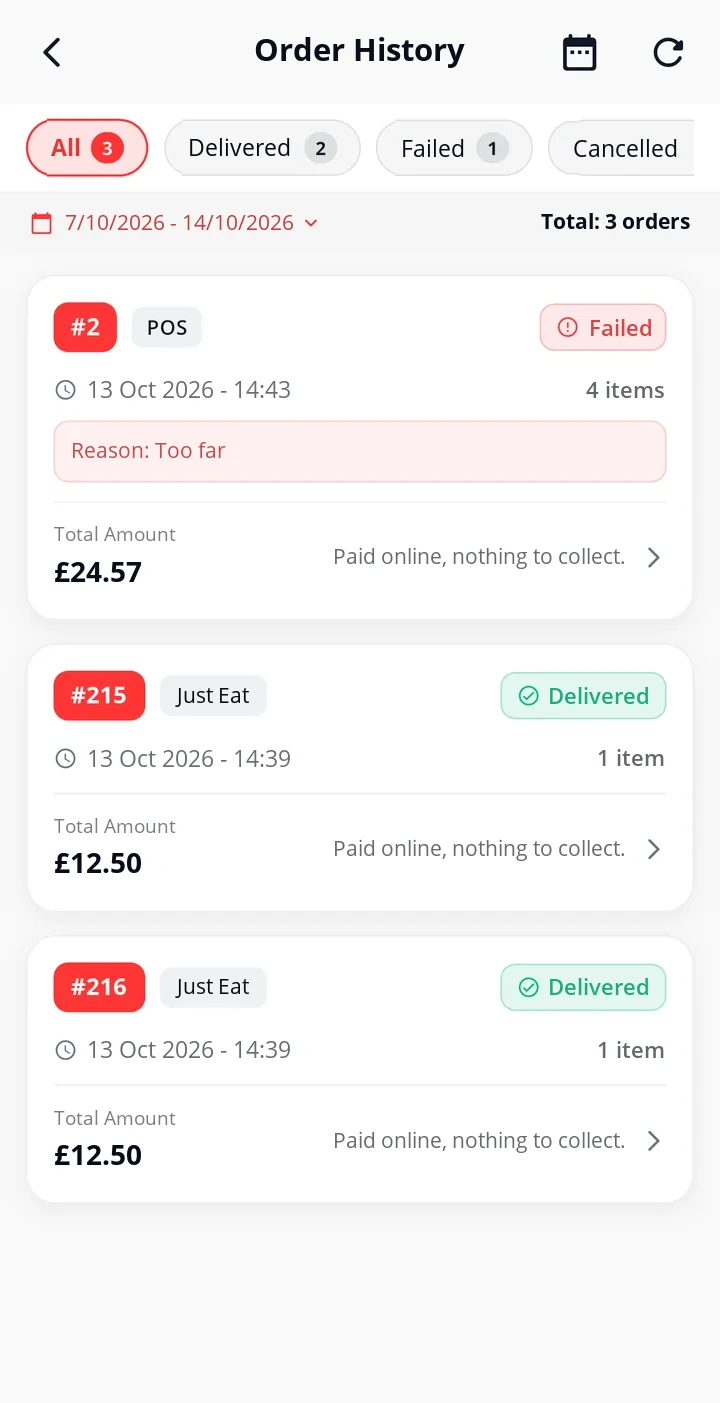
In their history, the courier filters the orders they have carried by date range and status. Each card shows the order's amount and, if it could not be delivered, the reason. The customer's name, phone number and address are removed from the courier history 24 hours after delivery.
- Status filtersDelivered, failed, cancelled; with their counts.
- With the reasonThe reason for an undelivered order is on the card.
- Data protectionCustomer details are removed from the courier history after 24 hours.
- 14 languagesCouriers use the app in their own language.
Live tracking at the till
Where's the courier? Check at the till, no phone call needed.
On the courier screen of your RestoPOS till, your couriers appear live on a map. You filter orders by status; which courier is online, which is busy, which order is running late and how much is to be collected at the door are all on the same screen.
Simplified illustration of the RestoPOS till courier screen. Data is for illustration only.
- Live mapCouriers' locations on the map; who was last seen when, in the list.
- Courier statusOnline, busy and offline couriers, with their counts.
- Status filtersPool, assigned, accepted, picked up, on the way, delivered, failed, cancelled, unpaid.
- Delays and paymentLate orders with the minutes, and the amount to collect at the door with the payment type.
Ecosystem
Not a separate system. Your RestoPOS till, out on the road.
RestoTrack takes orders from RestoPOS and passes every step back to RestoPOS. You manage couriers and delivery from your RestoPOS till.
Till (point of sale)
The order is assigned to a courier from the till; the courier's location and the order's status are followed on the map at the till.
Point of saleNavigation apps
Google Maps, Apple Maps, Yandex Navigator and Waze; the address opens in the app the courier chooses.
Phone notifications
A new order reaches the courier's phone as a notification.
How do you get started?
If you already use RestoPOS, it's a short step.
Your delivery orders are already in RestoPOS. All that's left is your couriers' phones.
-
1
Demo call
Together we look at your number of couriers and your delivery volume.
-
2
Couriers are set up
Each courier gets their own username and password.
-
3
The app is installed
The courier installs RestoTrack on their Android or iOS phone and logs in.
-
4
Packages head out
Orders go to the courier, and you follow them from the till.
Frequently asked questions
Questions you may have.
Which phones does it work on?
Android and iOS phones. It is in use in the field on both platforms.
How is an order assigned to a courier?
There are two ways: it is assigned to a courier from your RestoPOS till, or the courier scans the order's QR code and takes it on. Either way, the courier gets a notification on their phone.
Where can I see where a courier is?
On the map in the courier screen of your RestoPOS till. Couriers appear live on the map; the list shows which of them are online, busy or offline.
Does the courier choose the payment type?
No. The payment type comes with the order and is passed on to the courier. In the order details the courier sees whether the order has been paid online and how much to collect at the door.
What happens if an order cannot be delivered?
The courier reports the order, with the reason, using "Report Problem". The order is passed to RestoPOS as failed; the reason also appears in the courier's history.
Does customer information stay on the courier's phone?
No. The customer's name, phone number and address are removed from the courier history 24 hours after the order is completed. The amount, items and times remain in the history.
Which languages is it available in?
14 languages: Turkish, English (UK and US), German, Dutch, French, Spanish, Italian, Portuguese, Russian, Arabic, Chinese, Japanese and Korean. The language is chosen in the app by tapping a flag.
Related solutions
Paket Web — Orders from Your Own Website
Take commission-free orders through your own website. Your own brand, your own customer data.
ExplorePaket Lokal
Delivery and collection order management for single-branch businesses.
ExploreJust Eat, Uber Eats, Deliveroo and Wolt Integration
Delivery platform orders land straight on your POS screen.
ExploreCouriers and orders on one screen. Delivery made easy to manage.
Let us show you RestoTrack using your own couriers and delivery orders.
Why don't we list prices?A café with a single till and a chain with many branches don't have the same needs; we work out the price with you based on your number of branches, your hardware and the features you choose.