
Kitchen display system (KDS)
Whatever the kitchen is preparing, front of house knows.
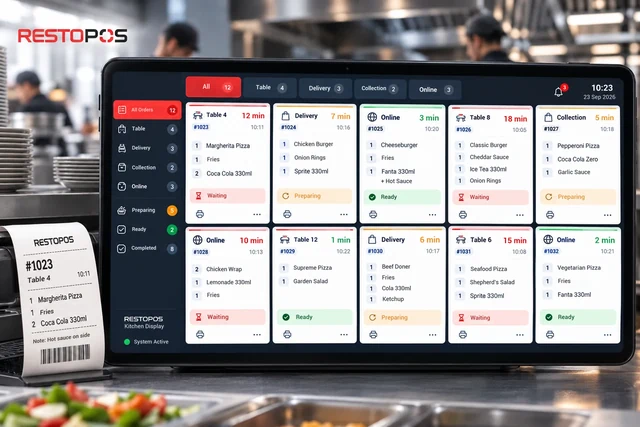
Orders from the table, the till, online ordering or delivery platforms all land on the same kitchen display. Each item's status is tracked separately; the service team sees what is ready without having to ask.
What does it do?
From order to service, one system in the kitchen.
- Every channel on one screenOrders from the table, the till, online ordering or delivery platforms all land on the same screen.
- Status per itemWaiting, preparing, ready. Each item's status is tracked separately.
- Audible alertNo new order goes unnoticed.
- First in, first outIncoming orders are numbered; the first order is the first to be handed over.
- Service numberOrders without a table are given a number; it appears on the receipt, the order ticket and the screen.
- Works with printersKitchen, bar and cancellation tickets go to the right printer; labels can be printed from the screen.
How does it work?
From order to table in four steps.
-
1
The order is taken
From the waiter handheld, the till, the QR menu, online ordering or a delivery platform.
-
2
It reaches the kitchen
The order lands on the kitchen display and the relevant printer at the same time.
-
3
It is prepared
The kitchen marks each item as waiting, preparing or ready.
-
4
It is served
Front of house sees what is ready without having to ask; delivery and collection orders go out with their service number.
Works together
Used alongside the kitchen display
The kitchen display is part of RSManager QR Menu; the waiter handheld also works in integration with the Resto Kitchen Unit.
Waiter handheld
Orders are taken at the table and go straight to the kitchen display.
Current pageTables and floor plan
The table is opened, the order is sent to the kitchen, the bill is closed.
See in all productsJust Eat, Uber Eats, Deliveroo and Wolt
Platform orders land at the till and in the kitchen.
Current pageFrequently asked questions
Questions you may have.
Do orders taken on the waiter handheld appear on the kitchen display?
Yes. The order is taken at the table and goes straight to the kitchen display; paper order tickets are no longer needed.
Do printers still work when there is a kitchen display?
Yes. The order lands on the kitchen display and the printers at the same time; kitchen, bar and cancellation tickets go to the relevant printer.
How are delivery and collection orders tracked?
Orders without a table are given a service number. The number appears on the receipt, the order ticket and the kitchen display.
Let's work out your price together
Tell us about your type of business and we will show you a configuration tailored to you in a free demo.
Why don't we list prices?A café with a single till and a chain with many branches don't have the same needs; we work out the price with you based on your number of branches, your hardware and the features you choose.