
QR Menu (MyMenu)
Digitise your menu and stop paying for printing. Price and content changes appear instantly.
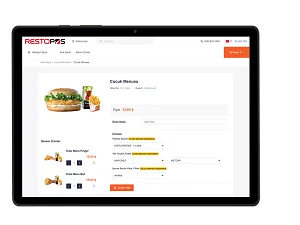
Digitise your business's menu with QR Menu. This saves you printing costs whenever product prices or contents change. You can edit your menu or switch it on/off at any time. Without installation or training, put your menu online smoothly in 2 minutes and protect both yourself and your customers.
Turn your menu into an online menu instantly! Offer your customers your menu, 100% compatible with the RestoPOS Point of Sale System, via QR code. Your customers can order whenever they like using the QR codes on the tables. Give your customers contactless ordering without them having to install any app!
Highlights
- They rate the products they order.
- Your customers view the menu interactively on their mobile devices.
- They get detailed product information (such as calories, recipe and description).
- They build their own order basket in the system.
- They can call a waiter, ask for the bill or view the table's bill details.
- They fill in a survey about the business and share their views.
- QR Menu supports multiple photos per product.
- The system supports multiple languages.
How do I switch to QR Menu?
- When you log in to the admin panel with the username and password we give you, you will see the list of Resto Point of Sale Automation installations you use. All you need to do is choose a branch for product synchronisation and start the sync. Your new online menu is ready instantly!
- Your product list is now in the cloud, and you can add or remove products whenever you like.
- You can sort your products however you like and feature them at any time.
- You can add images to your products and provide details in the product detail section such as product-specific notes, allergen information and cooking time.
- You can create your branch's own QR code in any size from the admin panel.
How is QR Menu used?
- With the QR code you place on the tables, your customers can access your menu by scanning the QR code with their camera, without downloading any app to their mobile devices.
- Your customers can browse your products and build a basket of the items they want without touching anything other than their own mobile phone or tablet.
- Your customer's selections are automatically turned into a QR code; the waiter scans it with a waiter handheld or the cashier with a QR code reader, and the order is taken contactlessly.
Related solutions
RestoPOS Kiosk
Guests order on screen in their own language and build their meal; they pay by card at the kiosk or in cash at the till. The order goes straight to RestoPOS.
Learn morePay at Table
Guests scan the QR code at the table, see the bill, split it and pay by card or mobile wallet.
Learn moreRSManager QR Menu, Online Ordering and Till
From online ordering and payment through a QR menu in 12 languages, to the till and table management, to the kitchen display and couriers: your restaurant's front of house in one system.
Learn moreLet's work out the right setup for your business together
Tell us your industry and how many branches you have, and we will show you a tailored setup in a free demo.