
RSManager QR Menu · Menu, ordering and till
Your menu on their phone, your orders in the kitchen.
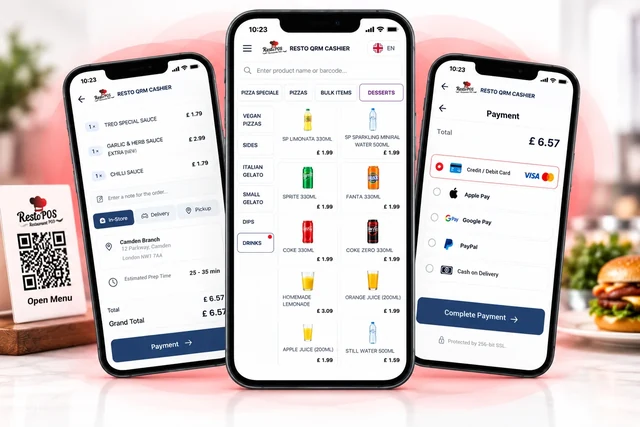
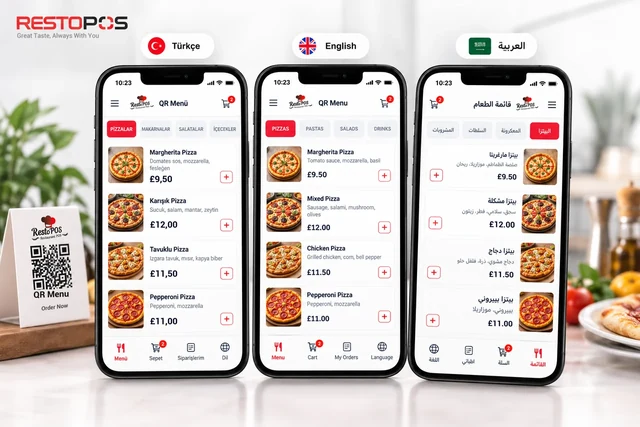
Guests scan the QR code and your menu opens in their own language. Online orders arrive together with their payment; every order from the till, the table or a delivery platform goes to the same kitchen display. Your restaurant's front of house in one system.
What is RSManager QR Menu?
Guests open the menu. Everything else flows through one system.
Printed menus go out of date, orders taken by phone get mixed up, paper tickets get lost in the kitchen. RSManager QR Menu connects the menu, orders, till, kitchen and courier to the same data: products and prices are defined once in RSManager, and every screen from the menu to the till works with the same up-to-date information.
-
1
Menu
Guests scan the QR code or open your menu at your web address.
-
2
Order
Online, till, waiter and delivery platform orders are gathered in one place.
-
3
Kitchen
The order goes to the kitchen display and printers at the same time, and preparation is tracked.
-
4
Service and delivery
It is served at the table, or assigned to a courier and tracked on the map.
-
5
Reports
Sales, channel, product and staff performance are shown on the report screens.
Who is it for?
Restaurants with tables, with deliveries, and those opening new branches.
It is used by all kinds of businesses, from a single-branch café to a multi-branch chain. You start with the channel you need; the digital menu, online ordering and the till are enabled per branch.
Restaurants and bistros
Table plan, waiter log-in, kitchen display and splitting the bill.
Cafés and bakeries
Fast till, adding products by barcode, service numbers for orders without a table.
Delivery businesses
Your own ordering website, delivery zone, courier assignment and live map.
Chain and franchise brands
Shared catalogue, copying menus between branches, products and prices from head office.
Businesses in tourist areas
The menu in 12 languages; international guests read and choose in their own language.
Businesses that take reservations
Online reservations made by guests themselves, and a table-and-time board.
For every role in your team
Everyone on their own screen, working on the same order.
Cashiers, waiters, the kitchen and couriers see the same order on their own screens; nobody has to pass information along by hand.
- Business ownerMonitors sales, channels, hourly traffic and staff performance through reports.
- CashierTakes dine-in, delivery and collection orders on one screen; handles split payments and tabs.
- WaiterLogs in with a PIN, sees their own tables, sends orders to the kitchen and splits the bill.
- KitchenSees the order on screen and prepares it item by item.
- Delivery managerAssigns deliveries to couriers and follows their status on a live map.
Modules
From menu to courier. One system, one set of data.
Start with the module you need; because they all work on the same product catalogue and the same order, the system grows with you as your business grows.
Online ordering and payment
Take home delivery and collection orders on your own website.
Delivery rules
To which address, at what time, for what minimum amount.
- Delivery zone check
- Choice of delivery and collection time
- Minimum basket value
Online payment
Guests pay the way they are used to.
- Credit card (3D Secure)
- Mobile wallet
- Cash on delivery option
Guests and accounts
Order without signing up; those who wish can create an account.
- Accounts with email verification
- Saved addresses
- "My orders" history
Till
Dine-in, delivery and collection orders on one screen.
Fast order entry
A till that stays fast even at peak times.
- Search by barcode, product code and name
- Set menus and extras
- Open-price items and order notes
Flexible payment collection
Every payment scenario is handled at the till.
- Split payments
- Change and tips
- Tabs and complimentary items
Customers and orders
Callers are recognised by their number.
- Caller ID
- Address entry from the map
- Future-dated orders, cancellations and partial refunds
Tables and waiters
See the state of the floor at a glance.
Table plan
A plan divided into sections that shows each table's status by colour.
- Opening tables, sending to the kitchen, closing
- Merging and splitting into sub-tables
- Moving items and transferring tables
Bill
Everyone at the table pays their own share.
- Paying for selected items
- Equal split per person
- Printing the bill
Waiter mode
Every waiter on their own screen, with their own permissions.
- PIN log-in
- Automatic screen lock
- Waiter-specific permissions and "My tables"
Kitchen and printing
Orders go straight to the kitchen, and the kitchen knows what it is preparing.
Kitchen display system (KDS)
A paperless kitchen with status tracked item by item.
- Waiting, preparing, ready
- Audible alert
Printers
Every ticket goes to the right printer.
- Order tickets and bills
- Kitchen, bar and cancellation tickets
- Thermal and label printers, cash drawer opening
Service number
Give a number to orders without a table.
- Shown on the receipt and order ticket
- Shown on the kitchen display
- Enabled per branch
Delivery and reservations
Plan the deliveries leaving your door and the guests still to come.
Courier operations
Where each delivery is, who has it and what state it is in.
- Live delivery map
- Courier assignment and status tracking
- Shift and branch assignment
Reservations
Fill your tables in advance.
- Calendar, list and table-and-time board
- Step-by-step reservation entry
- Online reservations made by guests themselves
Discounts and service charge
Rule-based discounts, all on record.
- Percentage or fixed-amount discounts, with an upper limit
- Service charge
- Reason lists for discounts and cancellations
Reporting
Know what happened before the day is over.
Sales and payments
What you sold and how you were paid.
- Overview and sales
- Payment types
- Hourly traffic
Channels and products
Which channels and which products carry your business.
- Sales by channel
- Product performance
- Cancellations and future-dated orders
Team and customers
Who did what, and who your customers are.
- Courier and staff reports, working hours
- Customer segments and customer details
- Exception and risk monitoring
Online ordering
The order comes in. So does the payment.
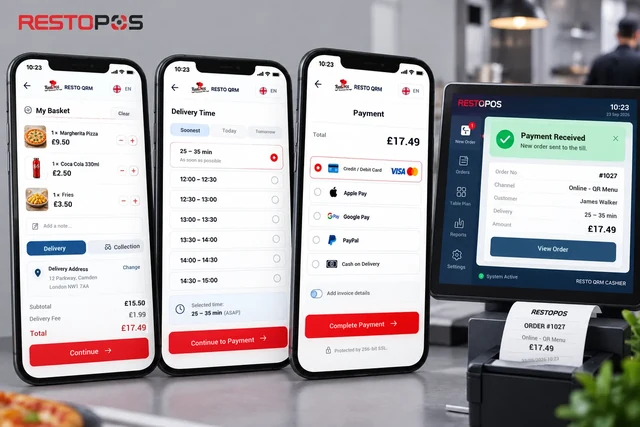
Guests place their order on your website, choose a delivery time and pay. The order arrives on your till and kitchen display already paid. Online ordering draws on the same catalogue as your menu; guests can also order without signing up.
- Delivery zoneWhether the address is inside your delivery zone is checked when the order is placed.
- Time selectionGuests choose the time for home delivery or collection.
- Minimum basketOrders below the amount you set cannot be placed.
- Online paymentBy card or mobile wallet, or cash on delivery.
Tables and waiters
A full house. You're in control.
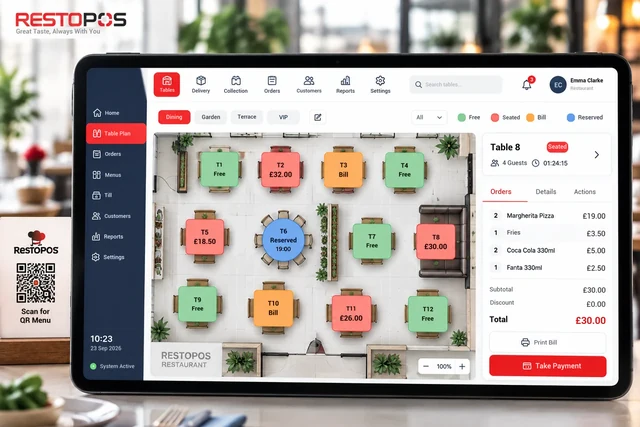
Which table is occupied, which is asking for the bill, which is free: you can see it at a glance on the colour-coded table plan. Waiters log in with their own PIN and can only carry out the actions they are authorised for.
- Merge and splitMerge tables or split them into sub-tables.
- Move and transferMove items to another table, or hand a table over to another waiter.
- Split the billPay for selected items or an equal amount per person.
- PIN and lockWaiter PIN, automatic screen lock and waiter-specific permissions.
Kitchen display
What the kitchen is preparing, the floor already knows.
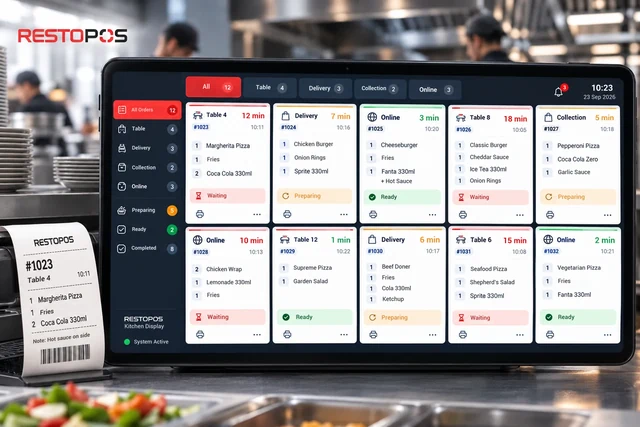
Orders from the table, the till, online ordering or a delivery platform go to the same kitchen display. Each item's status is tracked separately; the service team can see what is ready without having to ask.
- Item-level statusWaiting, preparing, ready.
- Audible alertNew orders never go unnoticed.
- Label printerLabels are printed from the kitchen display.
Multiple languages and branches
Your menu in 12 languages. Your branches in one catalogue.
International guests read the menu in their own language. Your branches share the same catalogue; when you open a new branch, you start by copying the menu, tables and settings from an existing branch.
- Türkçe
- English
- Deutsch
- Français
- Español
- Italiano
- Português
- Русский
- العربية
- 中文
- 日本語
- 한국어
- Shared catalogueBranches use the same product tree; prices are changed in one place.
- Menu copyingThe catalogue, tables and settings are carried over from one branch to another.
- Franchise permissionsHead office manages the catalogue; franchise branches can view it.
- Staff and shiftsStaff, couriers and shifts are assigned per branch.
Ecosystem and integrations
Fed by RSManager, talking to delivery platforms.
Products, prices and set menus are defined in RSManager and distributed to the QR menu and the till. Orders from delivery platforms go straight to your till; payment and advertising tools connect to your menu.
RSManager
Products, prices, set menus and settings come from RSManager; stock, invoicing and finance sit under the same roof in the back office.
Explore RSManagerDelivery platforms
Orders from Just Eat, Uber Eats, Deliveroo and Wolt land on the till screen.
Meta Pixel
Page view, product view and add-to-basket events on the menu at your own domain.
Windows till app
A launcher that opens the till in kiosk mode and requires a PIN to exit.
Local print service
A service that takes tickets from the queue and sends them to thermal and label printers.
Caller ID
Customers are recognised on incoming calls, and the delivery order opens with their address.
Payment and connection channels
- Credit card
- Mobile wallet
- Meta Pixel
How do you get started?
Four steps to your QR menu.
Your products come from RSManager; you don't have to write your menu from scratch.
-
1
Demo meeting
Together we map out how your business is structured and which channels you need.
-
2
Menu setup
Your products, prices and set menus are transferred from the RSManager catalogue to the QR menu.
-
3
QR codes and devices
Table QR codes are prepared; the till, kitchen display and printers are connected.
-
4
Go-live
You start taking orders; we are with you from day one.
Frequently asked questions
Your questions, answered.
Do guests need to download an app?
No. Guests scan the QR code with their phone camera and the menu opens in the browser. Online ordering does not require an account either.
Do I need to reprint the QR codes when I change prices?
No. The QR code stays the same; the menu behind it is updated. When a product or price is changed in RSManager, the change appears on the menu.
Can I start with just the digital menu?
Yes. Channels are enabled per branch. You can start with the digital menu and add online ordering, reservations and the till as the need arises.
Can guests order from the table?
The table QR code opens the menu and lets guests call the waiter with a single tap; the order is sent to the kitchen via the waiter or the till. Home delivery and collection orders, on the other hand, are placed online directly by the guest.
Can I see orders from delivery platforms?
Yes. Orders from Just Eat, Uber Eats, Deliveroo and Wolt land on your till screen.
Which payment methods are supported?
For online orders, guests can pay by card (3D Secure) or mobile wallet, or choose cash on delivery. At the till, cash, card, split payments, tabs and complimentary items are recorded.
Which devices does the till run on?
The till is browser-based. For Windows devices, a launcher app is also provided that opens in kiosk mode and requires a PIN to exit. Receipts are sent to the printer via the local print service.
I have several branches. Do I need to prepare a separate menu for each one?
No need. Branches can share a single catalogue, or one branch's menu, tables and settings can be copied to another.
I don't use RSManager. Can I use QR Menu?
QR Menu takes product, price and set menu information from the RSManager catalogue. We plan the setup process together in the demo meeting, based on how your business is structured.
Let your guests open the menu. Let the system carry the rest.
Let us show you QR Menu in a demo tailored to you, using your own menu and workflow.