
RSManager · Web-based business management system
Your business's back office in one panel.
Link sales to stock, stock to cost, and cost to invoicing and finance. From jewellers to hardware shops, from restaurants to multi-branch franchise chains, manage all of your business's back-office work in RSManager.
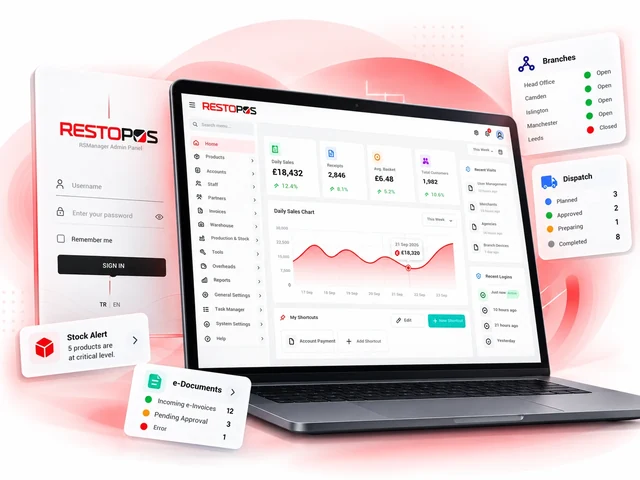
What is RSManager?
The sale ends at the till. That is when the real work begins.
Goods sold must be deducted from stock, depleted products must be bought from the supplier, incoming invoices must be posted to accounts, payments must leave the bank, and at the end of the period the business must know whether it made a profit. RSManager runs this entire chain in one system: data is entered once and every module uses the same data; manual transfers, duplicate entries and inconsistent reports are eliminated.
-
1
Sales
Sales invoices and sales from the till and online channels flow into the system.
-
2
Stock and production
Goods sold are deducted from stock; in businesses that produce, raw materials are deducted according to the recipe.
-
3
Purchasing
Supplier invoices and delivery notes are entered once, and stock, cost and accounts are updated at the same time.
-
4
Finance
Accounts, bank, cash, cheque and promissory note, and income and expense records make cash flow clear.
-
5
Reports and decisions
Reports by branch, product and period show cost and profitability on one screen.
Who is it for?
Every business that keeps stock, issues invoices and is growing.
It is used across different sectors, from retail shops to restaurants and from single branches to multi-branch chains. For food and beverage businesses it also offers recipe, menu and till integrations.
Retail and trading businesses
Stock, purchase and sales invoices, accounts and finance for jewellers, hardware shops and similar stores.
Restaurants and cafés
The entire back office, with recipe-based costing, menu management and till integration.
Chain and franchise brands
Structures where head office manages products and prices and branches run their own operations.
Central warehouse and production
Central warehouse and production set-ups that collect, plan and dispatch branch requests.
Delivery and fast food
Online ordering platforms, courier operations and high sales volumes.
Group companies
Groups that manage several companies and brands under one roof.
For every role in your team
Everyone does their own job on the same data.
Each user sees only the modules and branches they are authorised for, but everyone looks at the same up-to-date data.
- Business owner and managerSees profitability, cost and cash position by branch, product and period at a glance.
- Accounting and financeHandles invoices, delivery notes, accounts, bank, and cheque and promissory note transactions in the same system.
- Warehouse and purchasingKeeps stock, stock counts, transfers, dispatches and supplier invoices under control.
- Branch managerManages their own branch's sales, stock and request processes within their permissions.
Modules
Interconnected modules. One set of data, one panel.
Start with the modules you need; because they all work on the same data, the system grows with you as your business grows.
Product and price management
Define a product once; use it on invoices, at the till and across all sales channels.
Product catalogue
Central management of the product, group and attribute structure.
- Product groups and subgroups
- Product attributes and options
- Bulk import of products and images
Price groups
Different pricing by branch and sales channel.
- Branch-specific price lists
- Channel-specific prices
- Distribution of price changes to tills
Menu design and menu sets
Till screen and QR menu layout for food and beverage businesses.
- Till button layout design
- Menu (combo) products
- Copying menus between branches
Stock, warehouse and production
Know where your materials go and how much is lost.
Stock and warehouse
Goods-in, goods-out and transfer movements across multiple warehouses.
- Transfers between warehouses and branches
- Dispatch note printout
- Unit and quantity type management
Recipes and cost
Raw-material recipes and true cost for businesses that produce.
- Product recipes based on raw materials
- Automatic stock deduction from sales
- Product cost reports
Stock counts, consumption and write-offs
Compare physical stock with system stock.
- Product counts and count variances
- Consumption and write-off slips
- Loss and wastage tracking
Branch requests and transfers
Manage branches' material requests to head office from end to end.
- Requests sent from branch to head office
- Request pool and dispatch plan at head office
- Dispatch document and stock movement on plan approval
Invoices and delivery notes
Manage purchase and sales invoices linked to stock and accounts.
Purchase invoices
Supplier invoices posted to stock and accounts in a single step.
- Supplier invoices entered once
- Support for discounts, VAT and additional taxes
- Automatic goods-in from invoices
Sales invoices
Issuing sales invoices and passing them to accounting.
- Invoice templates
- Transfer to SAP
Delivery notes
Recording incoming delivery notes and linking them to invoices.
- Recording incoming delivery notes
- Linking delivery notes to invoices
- Converting delivery notes into invoices
Finance
Track what you owe, what you are owed and your cash flow on one screen.
Accounts
Full tracking of supplier and customer accounts.
- Account transactions and balances
- Account statements and Excel export
- Opening entries and account categories
Bank, cash, cheques and promissory notes
Management of collections, payments and negotiable instruments.
- Bank and cash transactions, bank statements
- Cheque and promissory note tracking
- Cash journal
Income, expenses and partnerships
Tracking of business expenses and partners' shares.
- Overhead expense records
- Partner accounts
- Accounting code mapping
Staff and operations
Organise your team and your daily workflow.
Staff
Employee records and entitlement tracking.
- Staff cards and departments
- Entitlement definitions and staff statements
- User and role assignments
Task manager
Work orders and scheduled tasks.
- Assigning work orders to the team
- Scheduled automatic jobs
- Central task tracking
Support and help
Get support without leaving the panel.
- In-app support requests
- Requests with file attachments and instant notifications
- Screen-specific user guides
Reporting
Spend your time making decisions instead of collecting data.
Sales reports
Sales analysis broken down by branch, product and channel.
- Branch sales and stock deducted
- Front-of-house and delivery sales split
- Sales by platform
Management dashboards
A summary view of invoicing and accounting status.
- Accounting dashboard
- Invoice dashboard
- Grouping with report tags
Report builder and export
Reports and exports tailored to your needs.
- Customisable reports
- Export to Excel
- Bulk data import/export
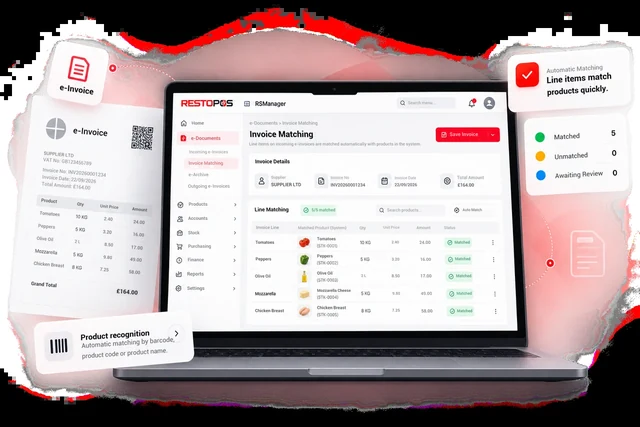
Supplier invoices
Enter the invoice once. Stock, cost and accounts follow.
A supplier invoice or delivery note is entered into the system once, line items are matched with your products, and stock, product cost and the payable on the account are updated in the same step. No more entering the same invoice in several places.
- Single invoice entryOpen the invoice, match the line items and save in a single step.
- Transfer to accountingPass your invoices to SAP.
- Range of taxesInvoices with discounts, VAT and additional taxes are processed in the same flow.
- Delivery note and invoice linkRecord the incoming delivery note and link it to the invoice.
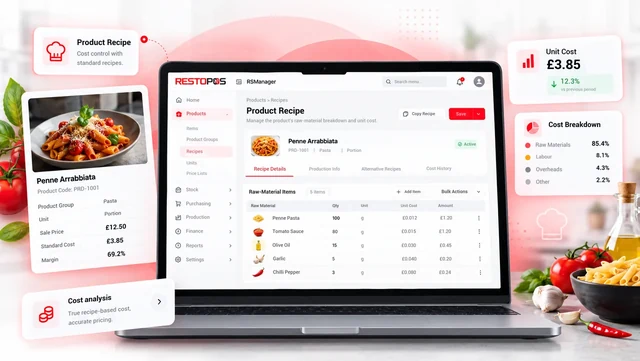
Recipe-based costing · food and beverage and production
See the true cost, not the selling price.
In businesses that produce, you define product recipes at raw-material level. Each sale is deducted from stock according to the recipe, and product cost is calculated with the current prices on purchase invoices.
- Automatic raw-material deductionEvery product sold deducts the ingredients in its recipe from stock.
- Up-to-date product costAs purchase prices change, cost is updated too.
- Wastage detectionCompare theoretical and actual consumption using count variances.
- Central recipesIn chains, recipes are defined at head office and used by branches.
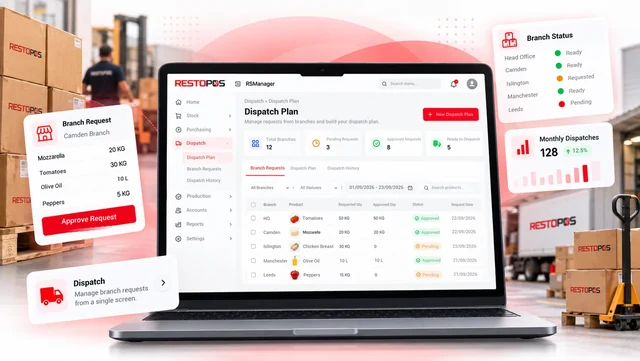
Head office and branch transfers
The branch requests, head office plans, the transfer is created automatically.
Branches notify head office of their needs through the panel. Head office collects incoming requests in a pool and creates a dispatch plan; when the plan is approved, the dispatch document and stock movement are created automatically.
- Request poolAll branch requests are collected in one place.
- Requested and approvedThe quantity the branch requested and the quantity head office approved are tracked separately.
- Combined dispatch planRequests from several branches are combined into a single plan.
- Dispatch documentOn approval, the document and stock movement are created.
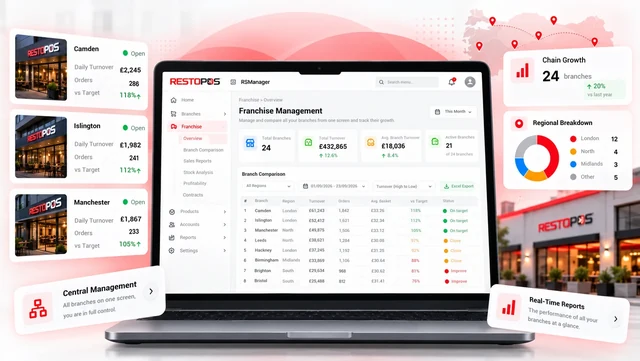
Multi-branch and franchise
All your branches. From one head office.
Designed from the ground up for group companies and franchise structures. Head office defines shared products, recipes and prices; branches run their own sales, stock and request processes. Everyone sees only the data they are authorised to see.
- Shared catalogueProducts, recipes and price groups are defined at head office.
- Branch-level permissionsUser authorisation by company and branch.
- Catalogue copyingCatalogue transfer between group companies.
- Consolidated reportA single report covering every branch.
Ecosystem and integrations
Talks to every application at the point of sale.
Products and prices are defined in RSManager and distributed to the points of sale; sales data comes back and becomes stock and reports. The till, QR menu, kitchen display and courier applications are mainly for food and beverage businesses.
Till (POS)
A till for front-of-house, delivery and collection sales; products, prices and button layout come from RSManager.
QR menu and online ordering
Ordering from the QR code on the table or from the web; the menu is fed from the RSManager catalogue.
RSManager QR MenuKitchen display system (KDS)
Orders reach the kitchen display without paper, with preparation tracking.
Courier app
Assigning delivery orders to couriers and tracking deliveries on a map.
Mobile management
The business owner's access to sales and reports from a mobile device.
Reports from branch servers
Secure transfer of data from local till databases to head office reports.
Connected platforms
- Just Eat
- Uber Eats
- Deliveroo
- Wolt
- SAP
Security and permissions
Your data is open only to those who need to see it.
In multi-branch, multi-user set-ups, you decide in detail who sees what and who changes what.
Role-based permissions
User authorisation at module and screen level.
Company and branch separation
Each company's and branch's data is kept separate.
Two-step verification
A second verification step at login, plus recovery codes.
Password policy
Strong password rules and mandatory password renewal.
How do you get started?
Moving to RSManager in four steps.
Bring over your existing product data and you can start using it in a short time.
-
1
Demo meeting
We review your business's structure and needs together.
-
2
Set-up
Your company, branch, warehouse and user structure is created with the set-up wizard.
-
3
Data transfer
Your product, group and price data is moved into the system by bulk import.
-
4
Go-live
You start working in the system, and we stay by your side with in-app support and guides.
Frequently asked questions
Questions you may have.
Is RSManager only for restaurants?
No. The stock, invoicing, accounts and finance modules suit every sector; retail businesses such as jewellers and hardware shops also use RSManager. Recipe, menu, QR menu and till integrations are additional capabilities for food and beverage businesses.
Is RSManager till software?
No. RSManager is the management system behind the till: stock, cost, invoicing, finance and reporting. It works in integration with the till and QR menu applications; products and prices are distributed from RSManager to the points of sale, and sales data flows back.
Does it need to be installed?
No. RSManager is web-based; it is used in a browser on any computer with an internet connection.
I have more than one branch. Can I manage them all from a single account?
Yes. Head office sees every branch and defines shared products, recipes and prices; branch users can access only their own branch's data.
Is it suitable for our franchise structure?
Yes. The system is designed for group companies and franchise structures. Permissions for head office and branch users are set separately; branches can raise requests with head office, and head office can plan transfers.
Does RSManager work with SAP?
Yes. Supplier invoices and delivery notes are entered once and posted to stock, cost and accounts; invoices can then be transferred to SAP.
I work with online ordering platforms. Are my sales reflected in stock?
Platform products are matched with RSManager products, so sales coming from the platform are also deducted from stock and reflected in reports.
Can I bring over my existing product list?
Yes. Products, groups and images can be brought into the system with bulk import tools; our team supports you throughout the migration.
Is my data secure?
Each company's data is kept separate. Users can access only the modules and branches they are authorised for; two-step verification can be used at login.
How do I get support?
You can open a support request from within the panel, attach files to your request and track its status. The help links on each screen open the relevant user guide.
Your business can grow. Your back office keeps up.
Let us show you RSManager in a demo tailored to you, using your own products and workflow.