
RestoPOS Handheld · Ordering at the table
The easiest way to take orders. Nothing forgotten.
Waiters no longer memorise an order and walk it over to the till. At the table they open the phone, pick the item with its portion and options, and tap to send the order. It reaches RestoPOS instantly. The floor plan, the menu and the table's bill are in the waiter's pocket; it works on Android and iOS phones.
What are we selling?
We don't sell handhelds. We sell waiters who don't have to walk to the till.
An order kept in someone's head gets forgotten; an order written on paper gets keyed in again at the till. With the handheld, the order is entered once, at the table, and goes straight to RestoPOS. Waiters spend their time at the table, not on the way to the till.
-
1
Choose the table
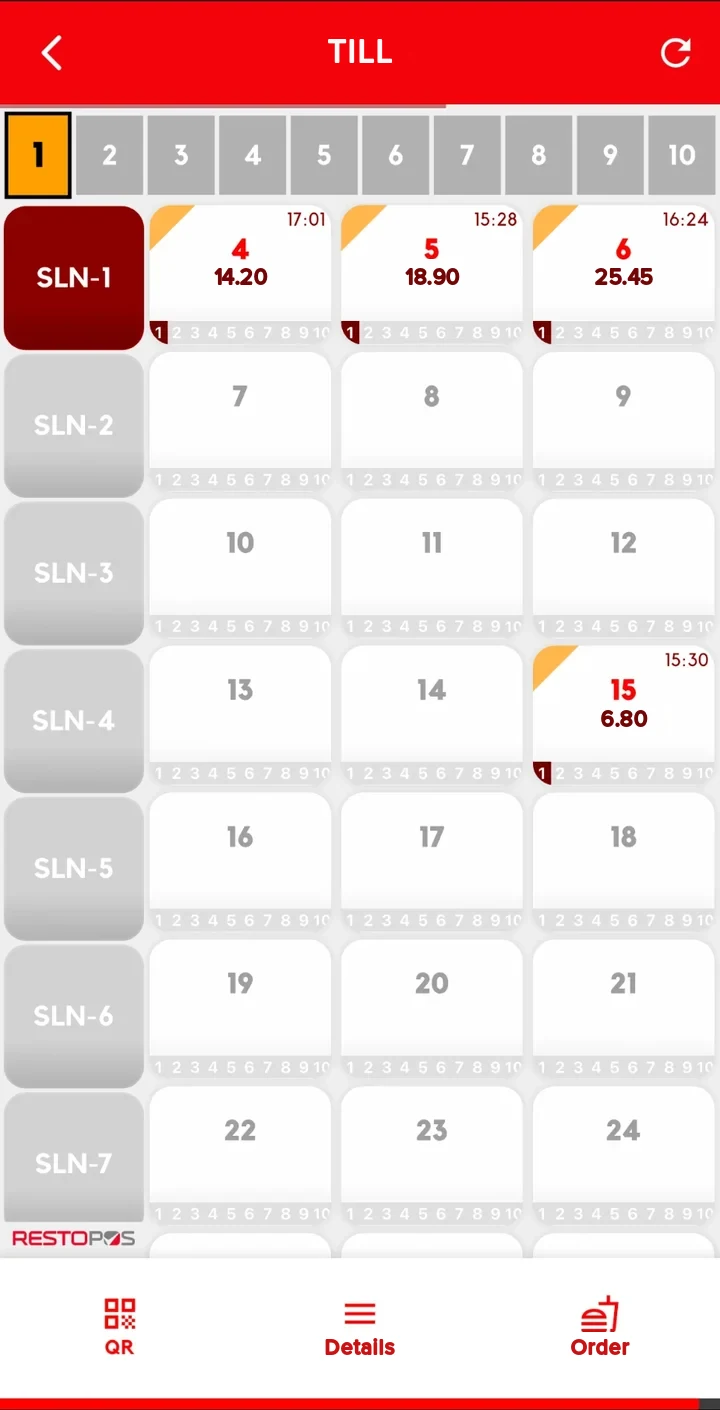
The waiter picks the dining area and table from the floor plan; occupied tables show the amount and the time they were opened.
-
2
Add items
They find the item in the menu or by search, then choose the portion, options or combo meal.
-
3
Send the order
One tap sends the order to RestoPOS. The same order is never sent twice.
-
4
Request the bill
When guests are ready to leave, the bill request also goes from the table to RestoPOS.
Who is it for?
Every business with table service whose waiters wear themselves out between the till and the tables.
The bigger the floor, the longer the walk to the till. The handheld takes that walk out of the job.
Restaurants
Portions, options and the guest's special requests go with the order, complete.
Cafés
Extra shot, double, half: chosen at the table, not written out again at the till.
Bars and pubs
At busy times, new orders go from the table without queuing at the till.
Bakeries and dessert shops
Items sold in portions go into the basket at the right price.
Hotel restaurants
Several dining areas and sections on one floor plan, area by area.
Beach venues
Orders are taken on the spot at sun loungers and tables far from the till.
Live floor plan
Which tables are occupied, and for how much? Waiters know without looking across the room.
The floor plan comes with the dining areas and table layout you set up in RestoPOS. Occupied tables show the amount and the time the table was opened; the waiter's own tables stand out with an orange mark in the corner. The strip under each table shows the status of its sub-tables by colour. The plan refreshes on its own.
- Area by areaDining areas on the left; tap one to see its tables.
- Amount and timeAn occupied table shows its bill and the time it was opened.
- Sub-tablesUp to 10 separate bills on one table; each one's status is shown by colour.
- Own tablesThe waiter's own tables are marked; another waiter's tables depend on permission.
Modules
Tables, orders, bills. All in the waiter's pocket.
Everything a waiter does at the till can be done on the handheld. The business decides which buttons are shown.
Floor plan
Exactly as you have it in RestoPOS.
Dining areas and tables
The dining area and table layout come from RestoPOS.
- Dining area selection on the left of the screen
- Optional "All" button
- The plan refreshes on its own
Table status
Know a table's status without looking at it.
- Amount and opening time on occupied tables
- The waiter's own tables are marked
- Another waiter's tables look different
Sub-tables
Separate bills on the same table.
- 10 sub-tables per table
- Each sub-table's status shown by colour
Ordering
Finding an item takes seconds.
Menu
Menu groups and sub-menus.
- Menu groups on the left, items on the right
- Colour-coded menu layout set up for your business
Item search
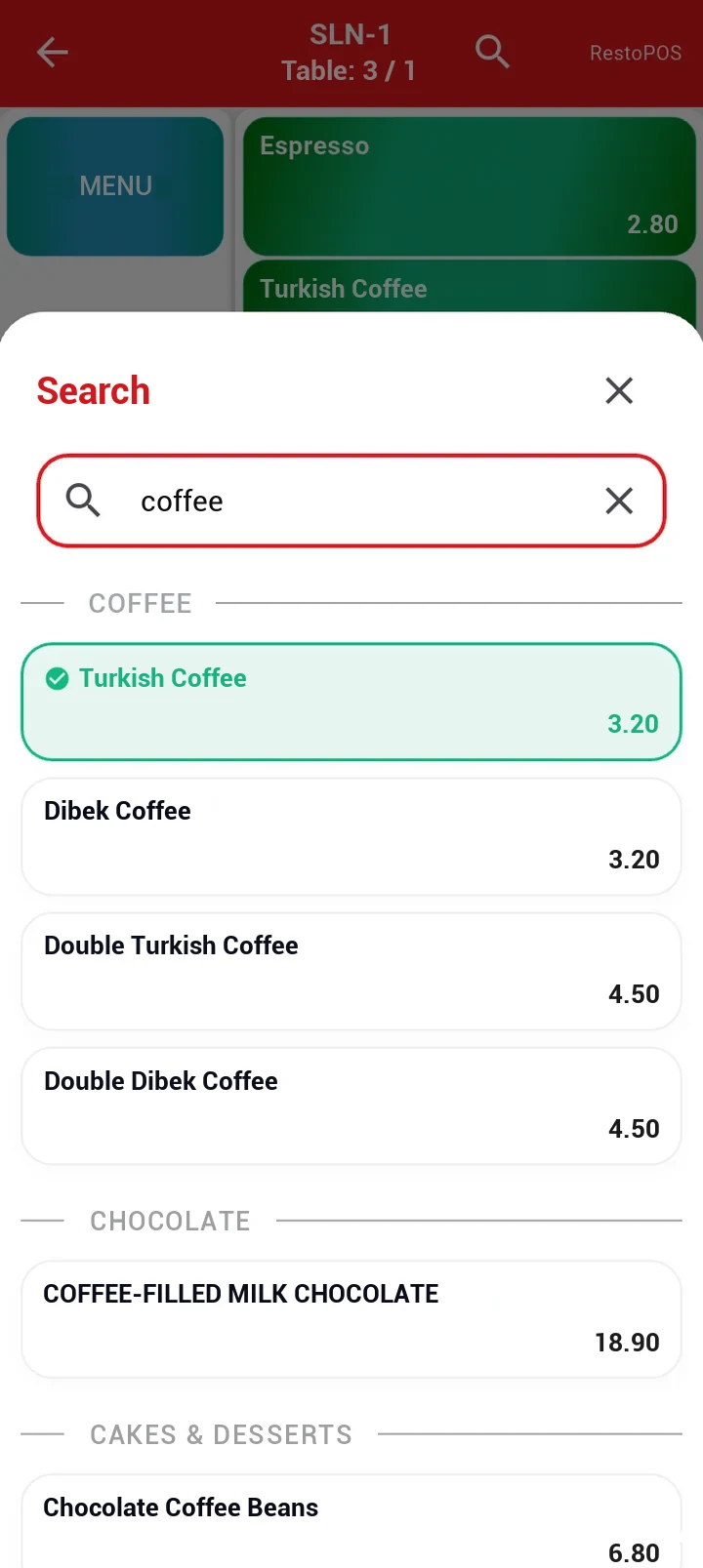
Type the name and the item appears.
- Results headed by menu group
- Items already in the basket are marked
Basket and sending
The order is entered once and sent once.
- Basket and the table's total on the same screen
- One tap sends it to RestoPOS
- The same order is never sent twice
Portions and options
Exactly as the guest asked.
Portions
Half, single, one and a half, double.
- Price calculated by portion
- Turned on if the business wants it
Options
Paid or free choices.
- Paid options are added to the price
- An item can't be added until required options are chosen
- Options can be typed in by hand if the business wants
Combo meals
The meal is built group by group.
- Minimum and maximum choice rules for each group
- Moves to the next group once one is complete
- Options on items within the meal too
Table actions
Without going to the till.
Bill
The table's bill on screen at any time.
- Item, quantity and price line by line
- Bill requests go to RestoPOS
Move and transfer
When guests change tables or a shift ends.
- Move table: the bill moves to another table
- Transfer table: the table passes to another waiter
Guest count and repeat
The table's details are with the waiter too.
- Enter the number of guests at the table
- Repeat order: the order ticket is sent again
- An "item ready" notification can be sent
Linking a customer to the table
With the Loyalty Management System.
- Scan the QR code in the guest's app
- The code can also be entered by hand
- The customer account is linked to the table
Security and control
Every waiter under their own name.
Waiter login
Waiters come from RestoPOS.
- A password for each waiter
- Automatic logout when idle
Permissions
You decide which buttons are shown.
- Permission to order for another waiter's table
- Move, transfer, guest count and repeat buttons can be turned on or off
- Settings are password-protected
Activity log
What was done on the device is recorded.
- Filter by waiter, table and date
- The log can be exported and shared
Ordering and search
Find the item, add it to the basket, send it. RestoPOS does the rest.
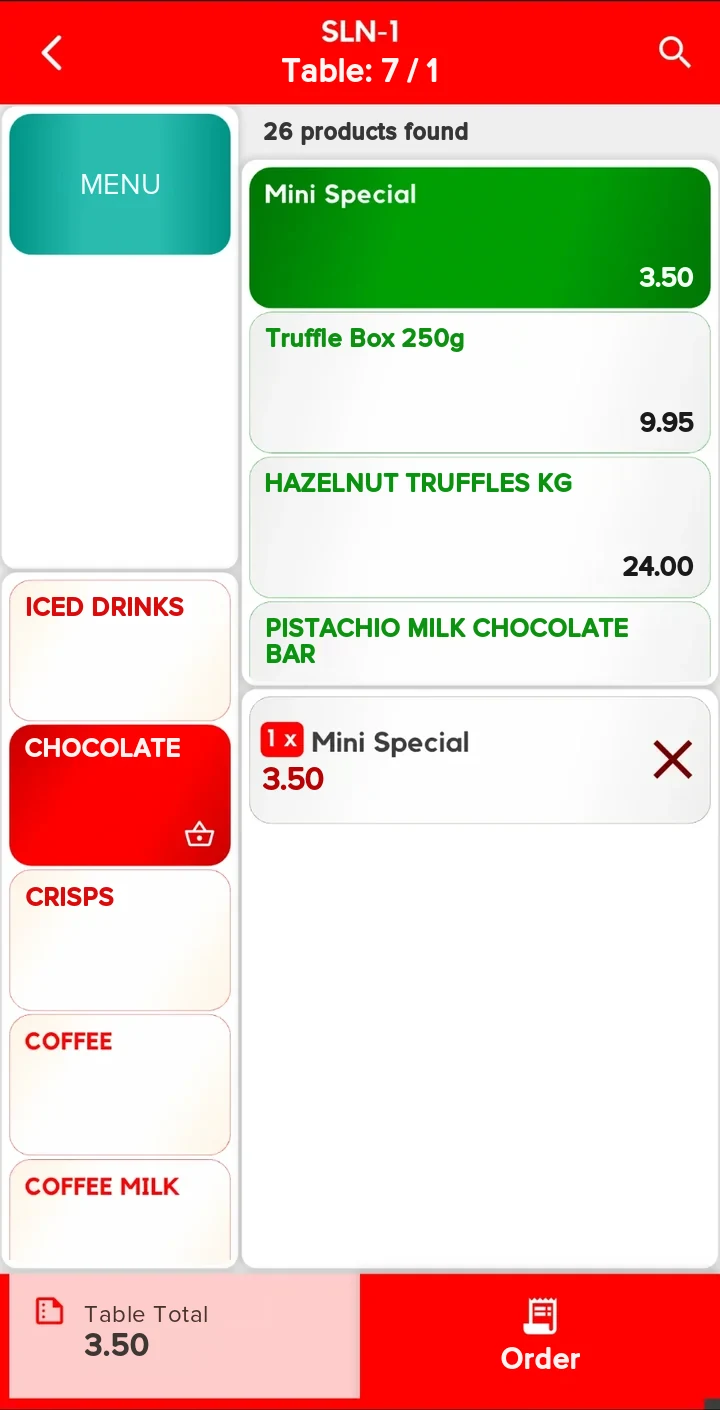
The waiter taps a menu group or types the item's name. The item drops into the basket and the table's total updates at the bottom. One tap sends the order to RestoPOS; no writing on paper, no keying it in again at the till.
- Menu groupsGroups on the left, items with prices on the right.
- SearchResults by group; items in the basket are marked.
- Total always visibleThe table's bill at the bottom of the order screen.
- No double sendingThe same order never goes twice.
Portions, options, combos
The order goes through exactly as the guest asked.
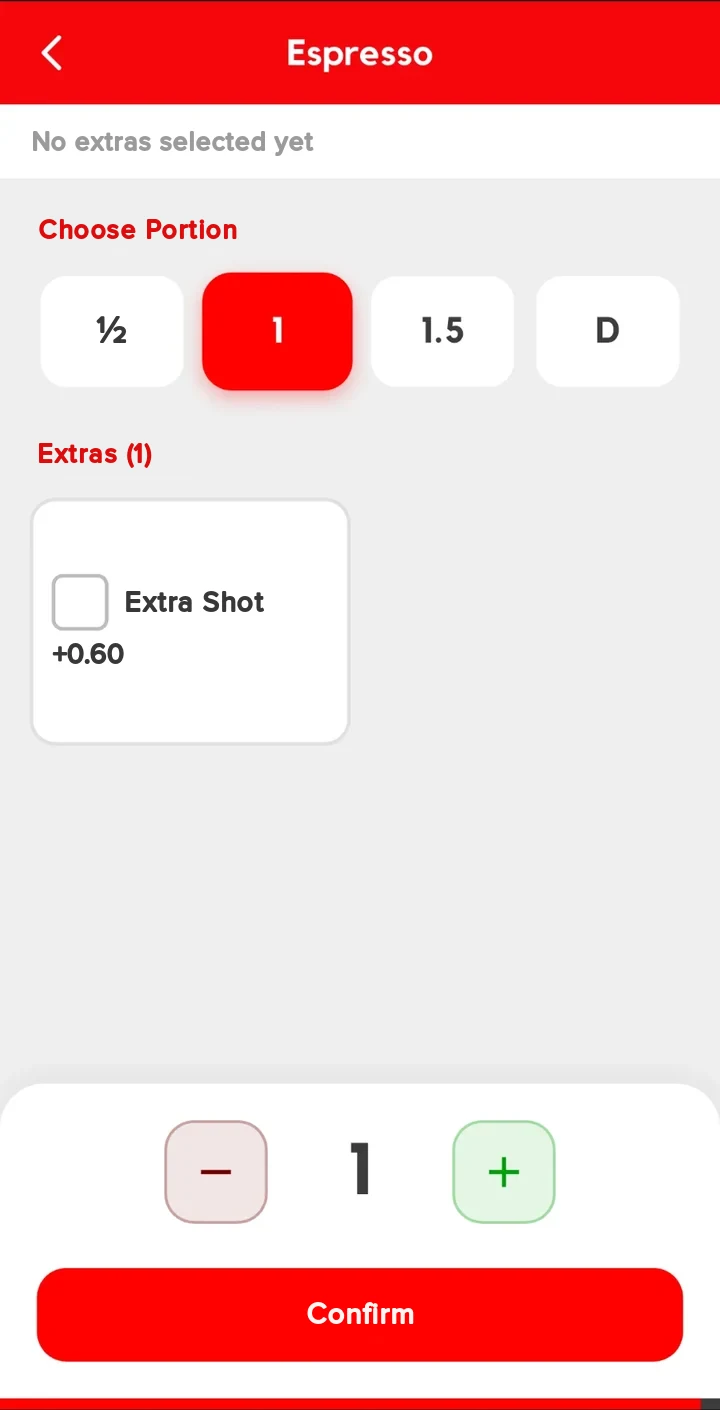
Requests like "make it a double, add an extra shot" don't stay in the waiter's head; they go with the order. When a portion is chosen, the price is calculated for it; paid options are added to the price. An item can't go into the basket until its required options are chosen. For combo meals, the waiter builds the meal group by group, with a set number of items to choose in each group.
- Four portionsHalf, single, one and a half and double.
- Paid optionsThe extra charge is added to the price automatically.
- Hand-written noteA request that isn't on the list can be typed in.
- Combo mealsGroups with minimum and maximum choice rules.
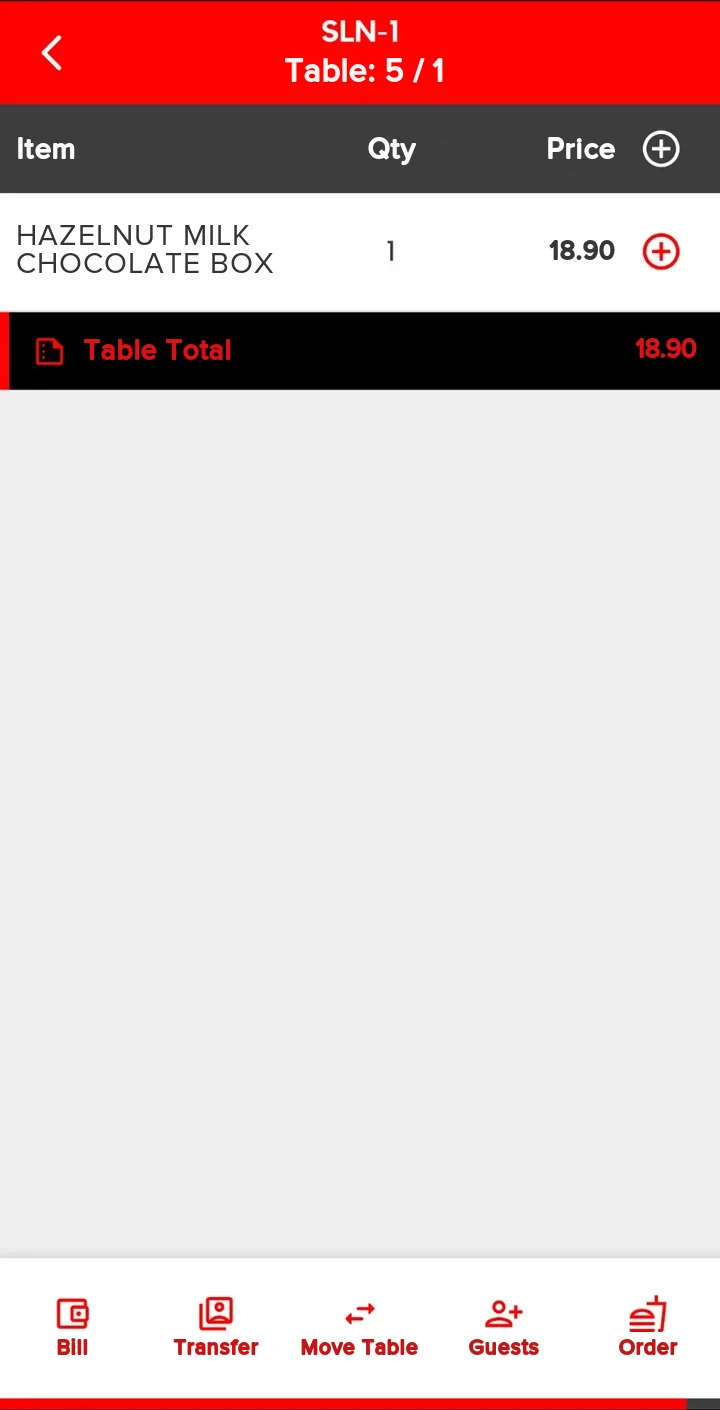
Table actions
Whatever is on the table is on the screen. Whatever needs doing is done from the table.
The waiter sees the table's bill item by item. When guests ask for the bill, the request goes from the table to RestoPOS. If guests change tables, the bill moves to the new table; if a shift ends, the table is transferred to another waiter. Guest count and repeat orders are on the same screen.
- BillBill requests go to RestoPOS.
- Move tableThe bill moves to another table.
- Transfer tableThe table passes to another waiter.
- Guest countEnter the number of guests at the table.
Ecosystem
Not a separate system. RestoPOS, in the waiter's hand.
The handheld takes the menu, tables and waiters from RestoPOS and sends orders to RestoPOS. You don't enter a separate menu.
Till (point of sale)
Menu, prices, table layout and waiters come from RestoPOS; orders are sent to RestoPOS.
Point of saleRSManager
Manage your branches, menu and prices from head office.
Central managementLoyalty Management System
The waiter scans the guest's QR code and the customer account is linked to the table.
Loyalty Management SystemKitchen display
In businesses that use the kitchen display, orders sent from the table to RestoPOS can be followed in the kitchen.
Kitchen displayHow do you get started?
If you use RestoPOS, there's very little to do.
Your menu, tables and waiters are already set up in RestoPOS. All that's left is connecting the phones.
-
1
Demo call
We go through your dining areas, number of waiters and menu together.
-
2
Download the app
RESTO PDA is a free download from Google Play on Android and from a link we give you on iPhone.
-
3
Connection and licence
The phone connects over your business's network to the computer where RestoPOS is installed; the device is then authorised.
-
4
Service
From day one, your waiters take orders at the table.
Frequently asked questions
Questions you may have.
Which phones does it work on?
Android and iOS phones. The app is a free download from Google Play on Android and from a direct link we give you on iPhone.
How does the phone connect to RestoPOS?
Over your business's network (Wi-Fi), to the computer where RestoPOS is installed. The device must be authorised and licensed before it can be used.
Do I need to enter the menu and prices separately?
No. The menu, prices, table layout and waiters come from RestoPOS. Any change you make in RestoPOS is reflected on the handheld.
Can the handheld take payments?
RestoPOS Handheld is for orders and bill requests; it does not take payments.
Can a waiter enter orders for another waiter's table?
Yes, if the business allows it. If this permission is turned off, waiters can only enter orders for their own tables.
Which languages is it available in?
Turkish, English, German, French and Dutch. The language is chosen in the app by tapping a flag.
What if a phone is lost or left logged in?
Each waiter can be given their own password; the app logs the waiter out after a set period of inactivity. Settings are also password-protected.
Keep waiters away from the till. Take orders at the table.
Let us show you RestoPOS Handheld with your own menu and floor plan.
Why don't we list prices?A café with a single till and a chain with many branches don't have the same needs; we work out the price with you based on your number of branches, your hardware and the features you choose.